
Your clients sign an advisor disclosure and other documents with every application. Those documents pull your details from one page: Settings → Compliance details.
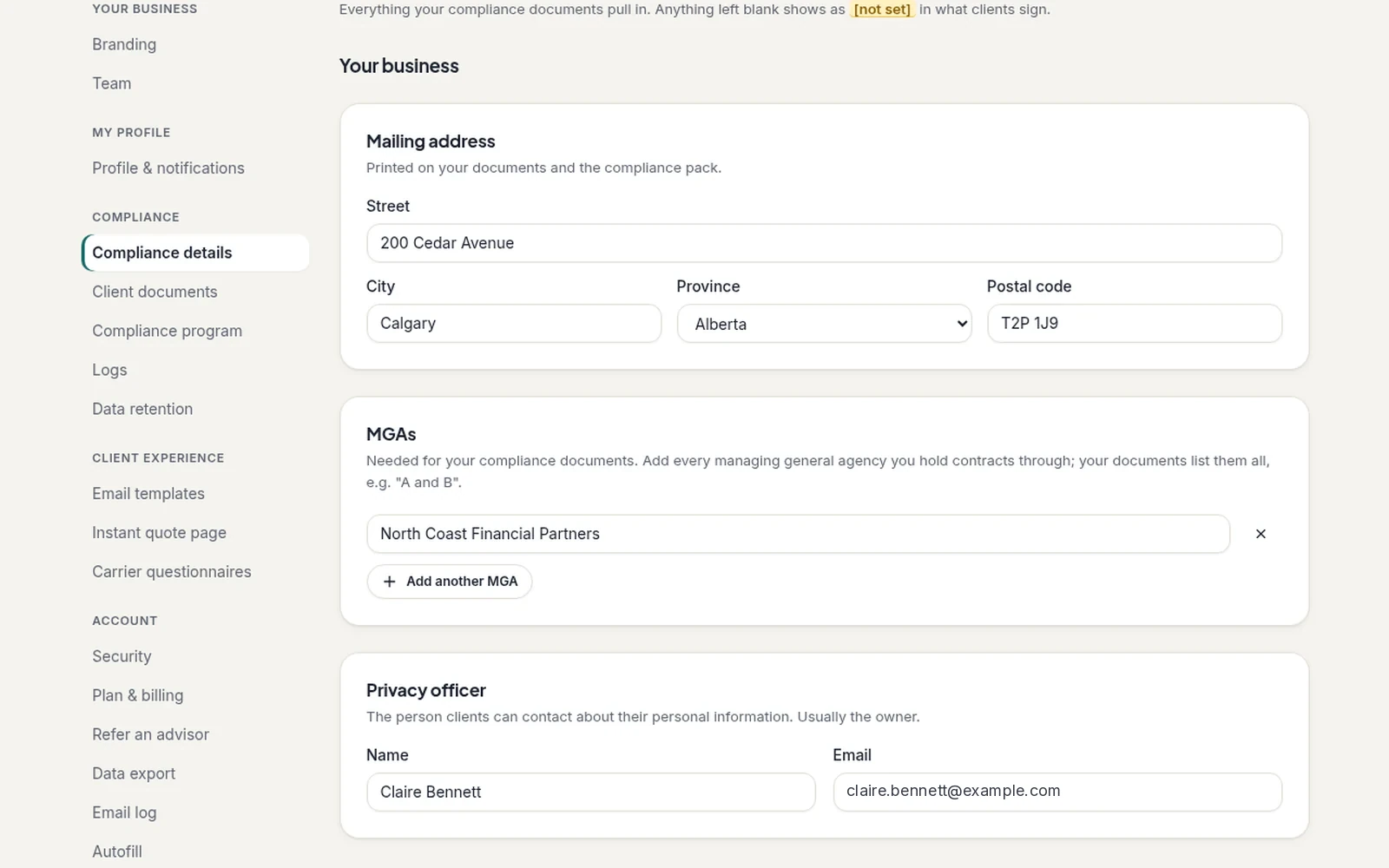
What goes on Compliance details
Your business (owners and admins edit this):
- Mailing address: printed on your documents and the compliance pack.
- MGAs: every managing general agency you hold contracts through. Your documents list them all, for example "A and B".
- Privacy officer: the person clients can contact about their personal information. Usually the owner.
You (every advisor fills in their own):
- Provinces licensed
- Carriers you're contracted with: listed in your disclosure.
- Other business activities: regulators and MGAs require your disclosure to list any business you carry on besides insurance. Enter "None" if there isn't any.
- Errors & omissions insurance (optional): your insurer, policy number and expiry.
Click Save changes when you're done.
If something is blank
Nothing here stops you sending. These fill the advisor disclosure your client signs:
- provinces licensed
- carriers you're contracted with
- mailing address
- MGA
- other business activities
Anything left blank shows as "[not set]" in the documents. The send page lists what's not set yet and links to it, so you can fill it in first if you want to.
Adopt your compliance program
PolicyStream includes a written compliance program (Privacy Program, AML/ATF Compliance Program and Complaint Handling Policy). Owners and admins can download it as a compliance pack: one PDF for your compliance officer or MGA, with your policies and your current client documents shown for a sample client. Until an owner or admin adopts it, the pack is marked DRAFT.
- Go to Settings → Compliance program.
- Fill in the AML/ATF risk assessment (the clients you serve, the products you place and a few risk questions) and save it.
- Review the policies. Click Customise to change the wording, or keep the Standard PolicyStream wording.
- Click Adopt program. Type your full name as principal or owner. I am also the compliance officer is ticked; untick it to name someone else. Add an optional note and tick the box to confirm you approve it. Then click Sign and adopt.
- Click Download compliance pack.
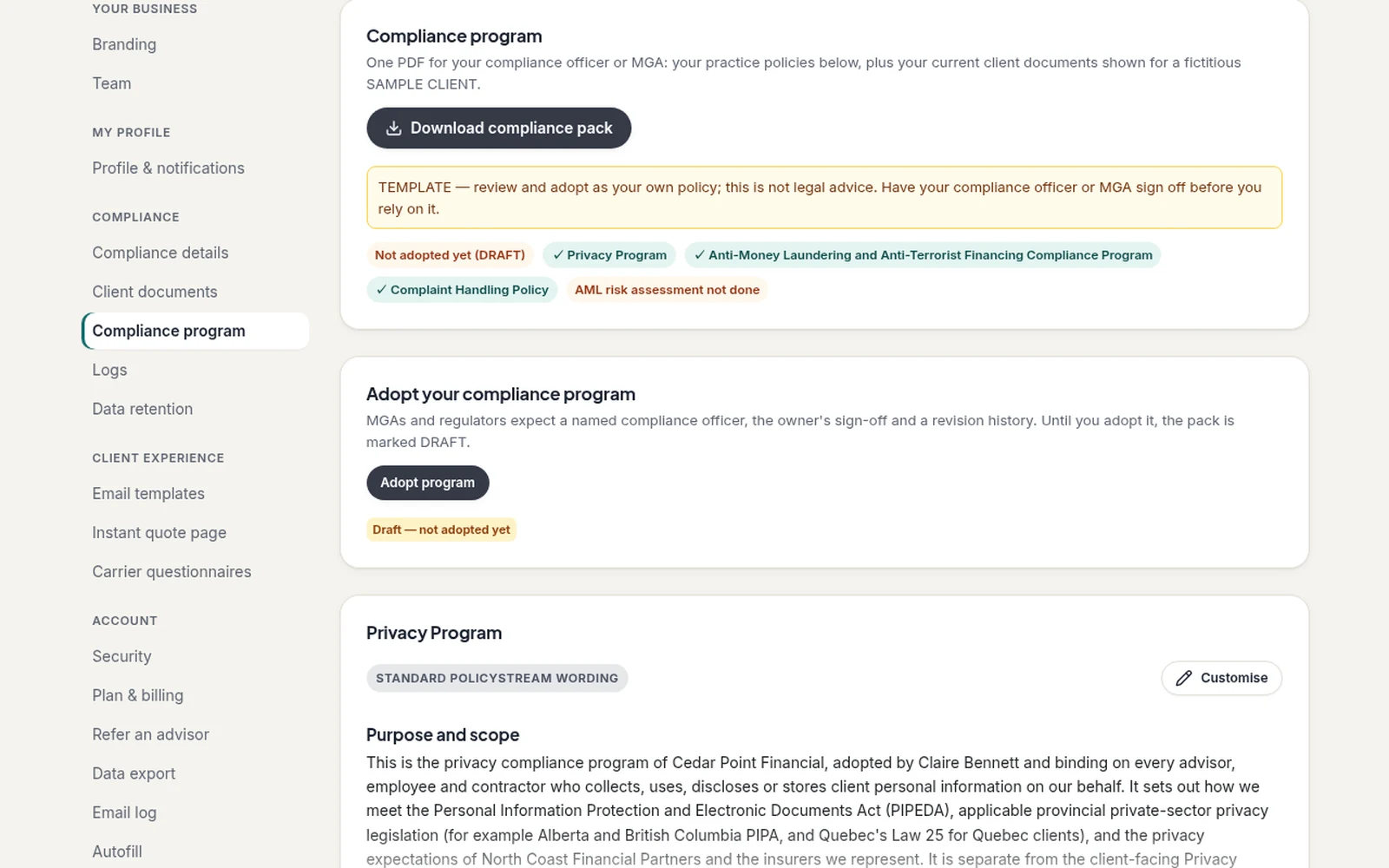
Each adoption is kept as a revision. If you edit a policy later, it shows as changed since the last revision until you click Re-adopt and say briefly what changed. The revision history prints in the pack.
Logs
Settings → Logs holds your Training, Complaint and Breach logs. Everyone on the team can add entries; owners and admins can delete them. They print in the compliance pack after the policy that requires them.
Data retention: medical answers
Carrier medical answers are only needed until the carrier decides, so PolicyStream deletes them on a schedule. Owners and admins set it in Settings → Data retention (under Compliance):
| What's deleted | Default | Choices |
|---|---|---|
| Medical answers after a policy is approved | 25 months | 13, 25, 37 or 61 months |
| Medical answers after a decline, withdrawal or void | 24 months | 12, 24, 36 or 60 months |
| Applications never submitted (counted from when the client link expires) | 90 days | 30, 60, 90, 180 or 365 days |
An application the carrier never decided on is still deleted: counted from when it was sent to the carrier (approved period) or submitted (decline period).
Each application shows the date its medical answers will be deleted. To delete them sooner, open the application and click Delete medical answers now, then type DELETE to confirm. You can do this once the carrier has approved, declined, or the application is withdrawn or void. Assistants can't.
What's deleted: the carrier questionnaire answers and their details, answers to Request more, and any carrier answers saved for reuse. What stays: the general application, the client file, the signed record and the activity history, until you delete the client. The application keeps a fingerprint of what the client signed, so the signed record can still be proven.
Good to know
- Missing details show as "[not set]" in the documents your client signs. Fill them in before you send.
- The carriers on Compliance details (for your disclosure) and the questionnaires the send page offers (Settings → Carrier questionnaires) are separate lists. For owners and admins, the setup wizard fills both from one answer.
- Each advisor's provinces, carriers, other business and E&O are their own. Owners and admins set the business details.
Still stuck? Email support@policystream.ca.