
Billing is in Settings → Plan & billing. Only owners and admins can see it, change the plan and pay. Only owners can cancel.
The free trial
New workspaces start with a 7-day free trial. You choose a plan and add a card at signup. Nothing is charged until your trial ends, when your plan starts and your card is charged automatically unless you cancel before then. Plan & billing shows your trial end date. Trials that began before the card requirement keep their original rules.
Signed up with another advisor's referral link? Your free trial lasts a full month instead (see Refer an advisor below).
Prices
| Monthly | Annual | |
|---|---|---|
| Solo (first seat) | $89 | $890 |
| Each extra advisor | $59 | $590 |
Prices are in Canadian dollars, billed in advance, plus tax. Owners, admins and advisors are paid seats. Assistants are free. Large team? Contact us for a discount.
Your plan and card
New signups choose a plan, billing province and card at signup. To review your plan or add a card to an existing trial:
- Go to Settings → Plan & billing.
- Under Your plan, pick Monthly or Annual (annual is marked "2 months free").
- Choose your Billing province (for sales tax). You'll then see the amount with tax, and Next invoice shows what's due.
- Click Add payment card. It works once you've picked a province. You type the card into our payment processor's secure form. PolicyStream never sees or stores the card number.
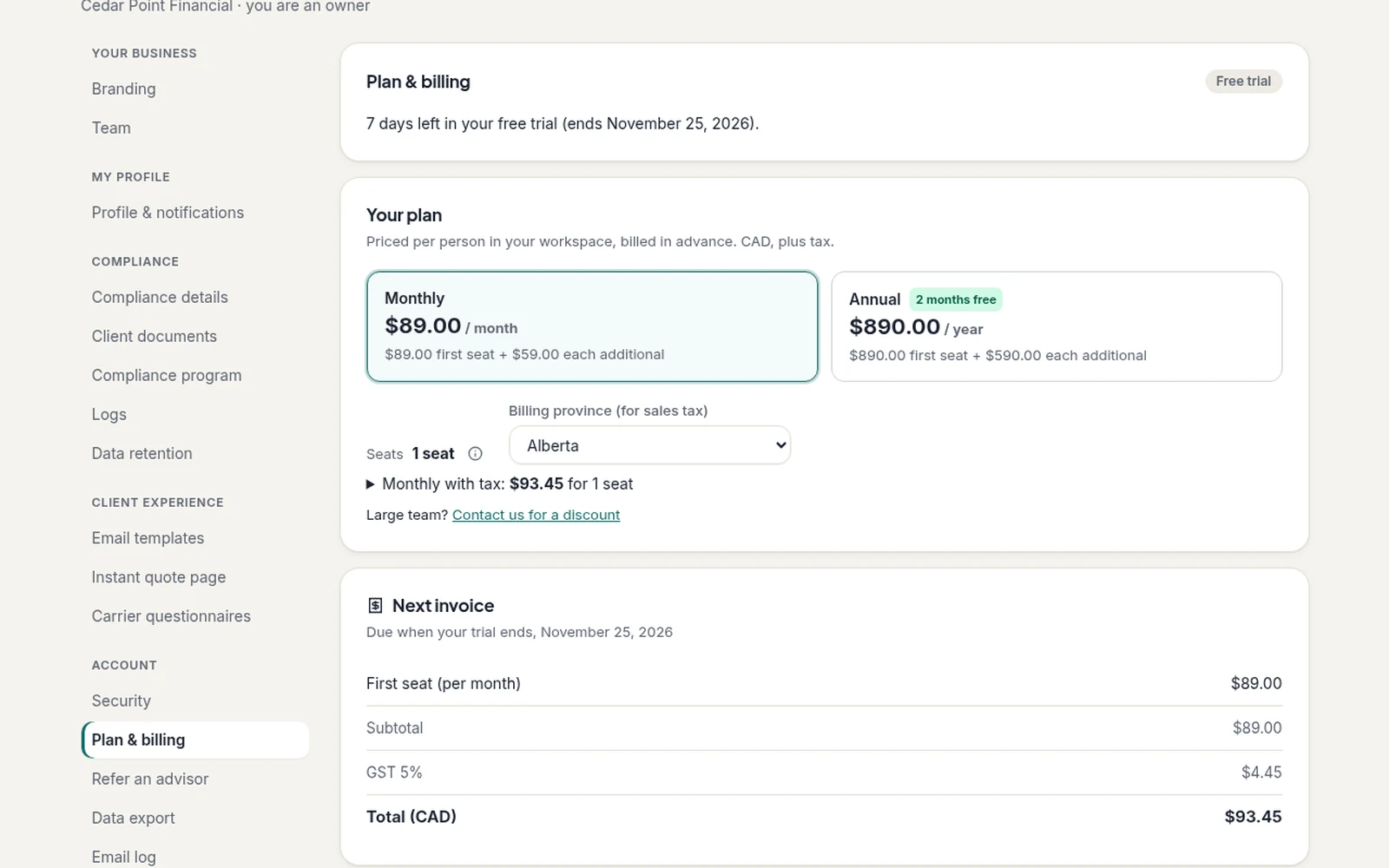
Your card is checked at signup without a charge. Your plan starts and your card is charged automatically when the trial ends. Cancel before then and you won't be charged.
Switching between monthly and annual on a running plan takes effect at your next renewal.
Adding and removing seats
Billing is prorated by month, never by day.
- Monthly plan: a seat added during the month costs $59 for that month, whatever day you add it.
- Annual plan: a new seat is charged for the whole months left in your year.
The extra amount goes on your next invoice. A seat you remove (or an advisor you turn into an assistant) has no credit. It drops off at your renewal.
Refer an advisor
Know an advisor who'd like PolicyStream? Send them your link and you both win.
- Go to Settings → Refer an advisor (owners and admins also see it on Plan & billing). Owners, admins and advisors can refer. Assistants can't.
- Click Copy and send the link to the advisor.
- They sign up with it and get their first month free instead of 7 days. A card is required at signup, with no charge until that month ends. Cancel before then and they won't be charged.
- When they add a card and pay for their second month, your workspace earns a free month.
There's no limit on how many free months you can earn. Each one is used at your next renewal: that month's seats are free and there's nothing to do. On an annual plan, a free month is one month, and then your yearly renewal carries on as usual. The card lists the people you referred (their business name, when they joined, and whether they're on their free month or paying) and how many free months your workspace has waiting.
Good to know: - The link works for someone setting up their first PolicyStream workspace, using the link when they sign up. It can't be added later. - Your link only works while your workspace is on its trial or a paid plan. - Free months take the cost of your seats off one renewal. They have no cash value and can't be exchanged for money. - We may change or end the referral program.
Invoices and receipts
Every invoice is listed under Invoices, with a PDF button to download it.
- When you subscribe, the owner gets one email confirming your plan, with a link to your invoices.
- After that, we don't email a receipt for each payment. To get one, owners and admins can turn on Email a receipt after each payment in the Invoices section. Receipts go to the workspace owner.
- On an annual plan, we email the owner 14 days before the yearly renewal.
- Each January, the owner gets one email saying last year's invoices are ready to download, for your books or taxes.
If a payment fails
- We try the card again 1, 3 and 7 days after the due date, and email the owner after each failed try. If the card was refused for good (for example, it expired or was reported lost), we don't retry it: you need to add a new card.
- You keep full access for 14 days after the due date. A banner shows the days left.
- After that, sign-in is locked for everyone until the invoice is paid. Links you've already sent to clients keep working.
To fix it, owners and admins click Update payment in the banner (or go to Settings → Plan & billing). Then click Pay now to charge the card on file, Replace card to use a different one, or Add a new card if the card was refused for good. Paying unlocks the workspace straight away.
Cancel your plan
Owners can click Cancel plan, then confirm. Your plan ends at the end of the paid period (or trial). There's no renewal and no refund for the time left. If you added seats during that period, they go on one final invoice. Everyone keeps full access until then. Changed your mind? Click Resume plan before the period ends.
Export your data
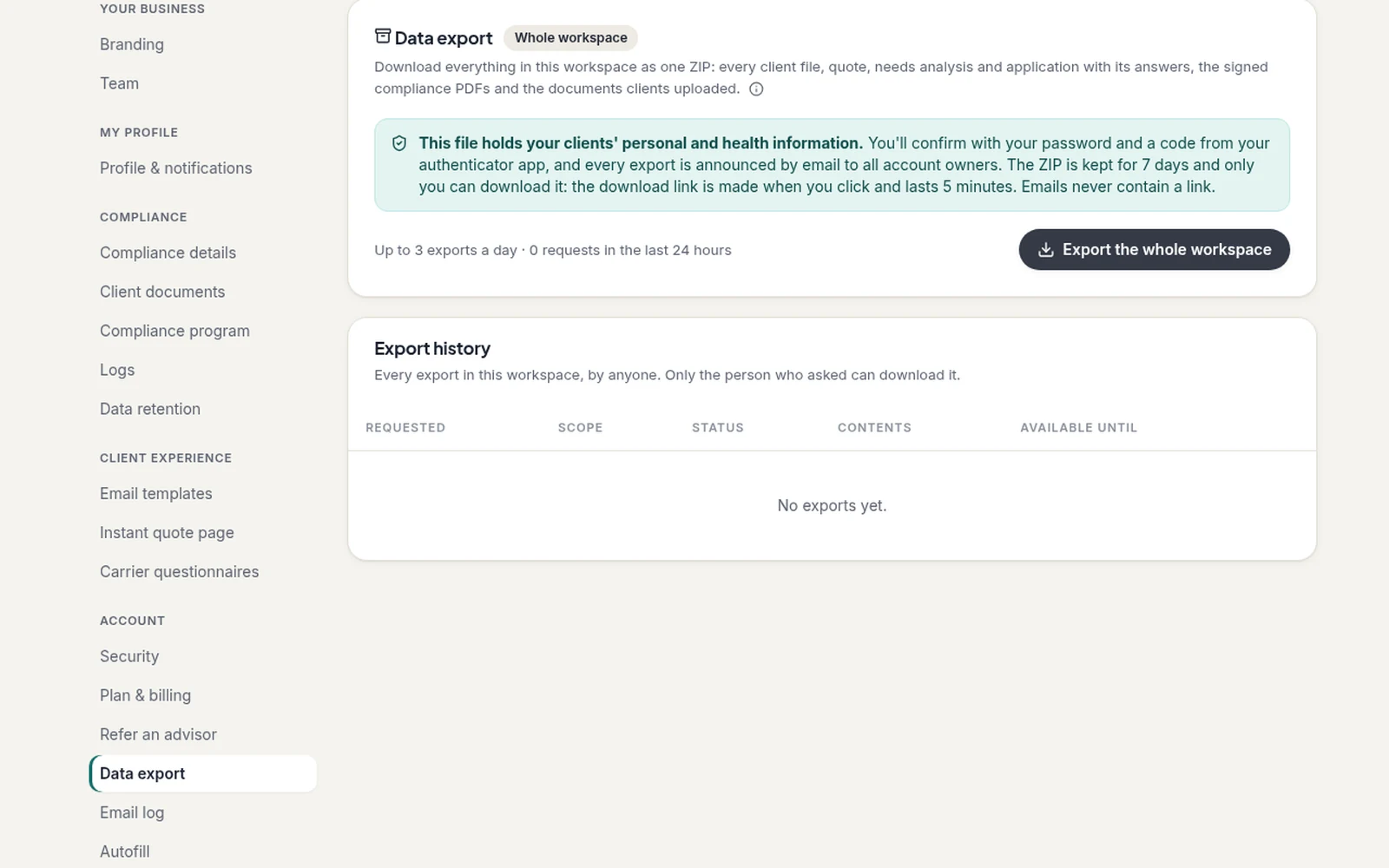
Go to Settings → Data export. Owners and admins click Export the whole workspace. Advisors click Export my clients. Assistants can't export. You need two-step sign-in on: enter your password and a code from your authenticator app, then click Confirm and export. We email you when the ZIP is ready, then you download it from the same page. It's kept for 7 days, and you can ask for up to 3 exports a day.
If your plan is cancelled or you close your workspace, owners and admins can still export for 30 days after access ends.
Good to know
- If an existing trial ends with no card on file (or the card can't be charged), sign-in is locked until an owner or admin adds a card and pays. Nothing is deleted, and links you've already sent to clients keep working.
- Sales tax is worked out from your billing province.
- Closing the workspace for good is a separate step in Settings → Workspace (owners only). It deletes everything after a 30-day export window.
Still stuck? Email support@policystream.ca.